Question: How do I reset the Connect SmartHome 4G Dual Camera?
Answer:
Model reference: CSH-4GDLN-667
Applies to: CSH-4GDLN-667
If your SKU differs, search our support page by your Model SKU to find the correct article.
Resetting the camera removes its current setup and prepares it for pairing again.
If the camera is not linked to an account:
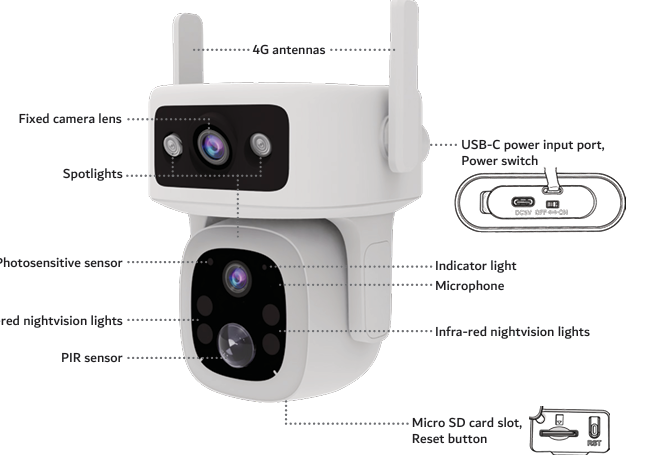
1. Locate the RST button on the bottom of the camera.
2. Press and hold the button.
3. Keep holding until you hear a beep.
4. Release the button.
5. Wait for the camera to restart.
6. When the blue light flashes quickly, the camera is ready to pair.
If the camera is already linked to an account:
1. Open the Connect SmartHome app.
2. Select the camera.
3. Open Settings.
4. Scroll down and tap Remove Device.
5. Choose whether to keep or delete the microSD card recordings.
6. Wait for the camera to beep and restart.
7. When the blue light flashes quickly, it is ready to pair again.
Always remove the camera from its existing account before trying to connect it to another account.
Was this article helpful?
That’s Great!
Thank you for your feedback
Sorry! We couldn't be helpful
Thank you for your feedback
Feedback sent
We appreciate your effort and will try to fix the article