Question: How should I install the Connect SmartHome 4G Dual Camera and solar panel?
Answer:
Model reference: CSH-4GDLN-667
Applies to: CSH-4GDLN-667
If your SKU differs, search our support page by your Model SKU to find the correct article.
Before installation:
1. Fully charge the camera.
2. Insert the microSD card if recording is required.
3. Set up the camera in the Connect SmartHome app.
4. Confirm the camera receives a strong 4G signal.
5. Test live view and motion detection before mounting.
For better camera placement:
- keep the camera upright
- do not install it upside down or sideways
- avoid positioning it behind glass
- avoid pointing it directly at moving cars, public roads or swaying trees
- avoid direct streetlights or bright sunlight
- position the camera so movement crosses the field of view
- tilt the camera downward by approximately 20 degrees
- keep the motion sensor level and parallel to the ground
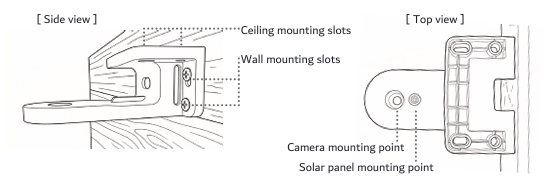
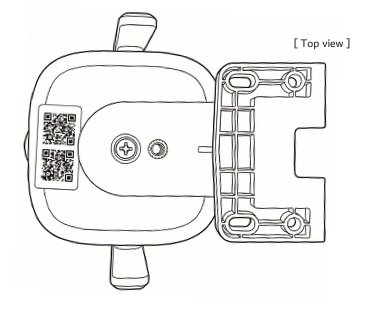
To mount the camera:
1. Hold the bracket in position.
2. Mark the mounting holes.
3. Drill holes and use wall anchors when mounting to brick or concrete.
4. Secure the bracket with the supplied screws.
5. Attach the camera using the Phillips-head screw.
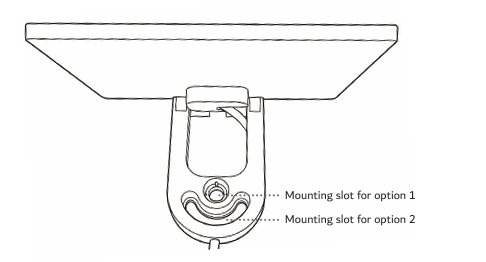
The solar panel can be:
- attached directly to the camera bracket using the thumb screw
- mounted separately using its 3-metre cable
Position the solar panel where it receives direct sunlight and secure it firmly against wind.
Was this article helpful?
That’s Great!
Thank you for your feedback
Sorry! We couldn't be helpful
Thank you for your feedback
Feedback sent
We appreciate your effort and will try to fix the article